- The Signal by RPN
- Posts
- Everyone Should be Using Claude Code and Cowork
Everyone Should be Using Claude Code and Cowork
Here's why Claude Code and Claude Cowork are the internet's new obsession

Roberto Nickson
January 21, 2026
Welcome back to The Signal, a weekly letter where I share stories, trends, strategies and insights to help you level up as a creator and win on the internet.
Today’s topics:
Why Claude Code and Cowork are the internet’s new obsession
How to Get Started with Claude Code and Cowork
How People are Using Claude Code and Cowork

What is Claude Code and Claude Cowork?
Claude Code is a command-line tool that lets you hand off entire coding projects to Claude.
Think of it like having an extremely capable software engineer with super-human speed working alongside you. If you can articulate in plain english exactly what you want, Claude Code figures out the steps and does the work.
It has been completely world-changing for software engineers.
But something interesting happened after Anthropic shipped Claude Code.
They noticed that people were using it extensively for non-technical things, since it effectively gave people a “pair of hands” to accomplish anything inside their computer.
So they built Claude Cowork specifically for non-technical users as it has a much more familiar and intuitive UI.
Why Are They So Important?
These tools represent a new evolution.
Anish from A16z calls it software’s “YouTube moment.”
Coding is shifting from a specialized skill to a medium for mass expression.
Tools like Claude Code have made it possible for non-technical people to take an idea to a working app within hours. Which is something that would have taken a technical person weeks to accomplish just a few years ago.
But they’re also capable of much more than just software. As you are about to see.
Which One Should I Use?
The key difference: Claude Code requires terminal knowledge and manual setup of your environment, while Cowork handles that automatically through a familiar chat-like interface in the desktop app.
So.
If you’re technical, or comfortable working with command-line tools, Claude Code is the much better option. It gives you much more flexibility and control.
If you’re non-technical, and not comfortable with terminals or coding interfaces, use Claude Cowork. It has a much more approachable interface.
How to Install Claude Code to your Computer
Open your Terminal app
On a Mac, press Command (⌘) + Space, type “Terminal” and hit Return
In Windows, press Windows key + R, type “wt”, and press Enter
Install Claude Code
On a Mac, run this command: curl -fsSL https://claude.ai/install.sh | bash
In Windows, run this command: irm https://claude.ai/install.ps1 | iex
Launch Clode Code: claude
Troubleshooting
You’re unlikely to face any issues, but if so, copy + paste or screenshot your error messages to debug with Claude:

How to Install Claude Cowork to your Computer
Cowork requires the desktop app as it not available on web or mobile.
At the moment, it is available to Claude Pro and Max plan subscribers only.
To access Cowork:
Open Claude Desktop
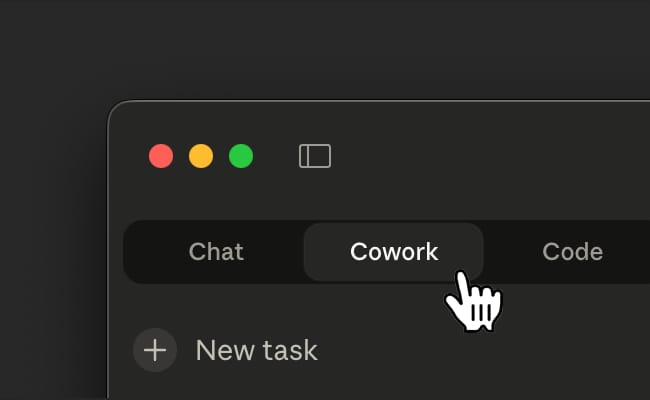
Look for the mode selector that includes "Chat" and the Cowork tab.
Click the Cowork tab to switch modes to “Tasks”.
Describe the task you want Claude to complete.
Review Claude's approach, then let it run.
How People are Using Claude Code and Cowork
Here’s a small collection of ways people are using Clade Code and Cowork, so you can get a better idea of how powerful they are.
Downloading YouTube videos
Prompt: Download this YouTube video as an MP4 at maximum quality: [URL]
I’ve been using Downie for years to download media from the internet. It’s fantastic software.
Recently, I’ve replaced it with Claude Code to download media from the internet (in any format I want!)
This is a great representation of why folks say SAAS is in trouble, as tools like Claude Code can essentially create “disposable software” to do any task at hand.
Editing Files
Lydia is using Claude Cowork for editing files.
"There is the video of a squirrel somewhere in this folder. Convert it to mp4 and apply a VHS effect."

Even if the squirrel isn’t in the thumbnail, Claude will go through multiple frames to locate it.
Insane.
Building Custom Interfaces
Shopify CEO Tobi Lutke used Claude to create a custom MRI dashboard that would have required clunky commercial software to view:

Process Amazon Returns and Reorders
Kyle used Claude Code to process a return for shoes he just ordered on Amazon and order the next size up.

Daily Personalized Research Reports
Using the resend API, 0xDesigner uses Claude to run a daily script that scrapes all of his socials and emails him a report with an analysis and content suggestions based on trends (with links) for the next day.
“Disposable” Apps for Any Purpose
You can likely cut a lot of subscription cost, by just cloning existing app that you use and pay for.
For example, Champ used Claude Code to build him a fully functional web app for tracking the best days to watch the sunrise in Miami in less than ten minutes, with 0 coding experience.

I hope by now you understand why Claude Code and Cowork have the tech industry so excited.
Even if it’s not immediately useful to you, I think it’s worth spending a few hours getting familiar with it as it represents a serious change in how we work with computers.
If you want the best guide that I have found to take you from beginner to pro on the internet, this X article is for you.
And here is a “how-to” by Boris Cherny, the creator of Claude Code.

Things I’m Loving Lately
This section includes products, services, creators and more that I'm loving lately. Everything below is organic and non-sponsored unless indicated.
‣ I should be moving into my new studio within 3 weeks. I’ve been using Nano Banana Pro to generate thousands of different design aesthetics for build inspiration. I think I am going to go with a vintage, low-industrial, modern tech hybrid. I’ve started ordering old gas station pumps, antique Coca-Cola Vendo machines, etc to surround my production stack with.
Below is some rough AI-generated inspiration, but I think it’ll look even better than this. It will be extremely functional. The entire idea behind the studio is to pump out high-quality social videos… fast and at sacle.
I can’t wait to share the final build.


Quick Hits
This section includes things I have found interesting and helpful this week.
‣ Dan Koe recently wrote perhaps the most viral Twitter article of all time, “How to fix your entire life in 1 day.”
‣ Sahil followed up with another value-packed article, “35 Things I know at 35 I Wish I Knew at 25.” I usually hate articles like this, but this one had me nodding in agreement through every word.
